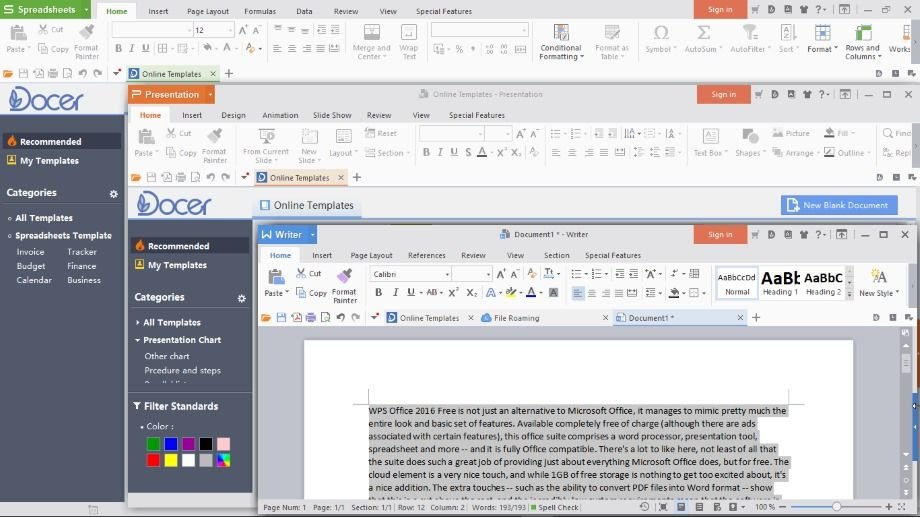
In today’s fast-paced digital environment, businesses and individuals are increasingly relying on cloud-based solutions to manage their work. WPS has emerged as a powerful tool in this domain, offering seamless integration with cloud services that streamline workflows, enhance collaboration, and improve productivity. With cloud adoption becoming essential for modern workplaces, understanding how WPS supports cloud-based workflows is vital for organizations and professionals aiming to optimize their operations.
Integration With Popular Cloud Platforms
One of the key advantages of WPS is its compatibility with a variety of cloud platforms. Whether using Google Drive, Dropbox, OneDrive, or its own WPS Cloud, the software allows users to store, access, and manage files without being tied to a single device. This integration ensures that documents, spreadsheets, and presentations are always accessible, whether you are working from an office, home, or on the go.
The seamless connection between WPS and these cloud platforms reduces the need for manual file transfers, decreasing the risk of losing important data. Users can open, edit, and save documents directly in the cloud, ensuring that the latest versions are always available to the entire team. This is especially useful in collaborative projects where multiple stakeholders need real-time access to shared files.
Real-Time Collaboration and Editing
Collaboration is at the heart of modern cloud-based workflows, and WPS offers robust tools to facilitate this. Multiple team members can work on the same document simultaneously, with changes being updated in real time. This eliminates the need for sending multiple versions of a file back and forth via email, which can cause confusion and errors.
WPS supports commenting, annotations, and version history tracking, which allows team members to provide feedback, suggest edits, and monitor changes efficiently. These features are particularly beneficial for remote teams or organizations with distributed workforces, ensuring that collaboration remains smooth and productive regardless of location.
Accessibility Across Devices
Another significant benefit of WPS in cloud-based workflows is its cross-platform accessibility. Users can access WPS on Windows, macOS, Linux, Android, and iOS devices, allowing work to continue seamlessly across desktops, laptops, tablets, and smartphones. This flexibility means that employees can review, edit, and share documents anytime and anywhere, boosting productivity and ensuring deadlines are met even when away from the office.
The synchronization feature of WPS Cloud ensures that changes made on one device are instantly reflected across all other connected devices. This consistency prevents conflicts between different versions of the same file, providing users with confidence that they are always working with the most recent document.
Security and Data Protection
Security is a critical consideration in cloud-based workflows, and WPS prioritizes the protection of user data. WPS Cloud employs advanced encryption methods to safeguard files during storage and transfer, preventing unauthorized access. Users can set passwords and permissions for documents, ensuring that sensitive information is shared only with authorized personnel.
In addition to encryption, WPS provides backup and recovery options to minimize data loss. Files stored in WPS Cloud can be restored to previous versions if needed, protecting against accidental deletion or corruption. This level of security gives organizations peace of mind while encouraging adoption of cloud-based workflows without compromising data integrity.
Automation and Workflow Efficiency
WPS supports various automation tools that enhance cloud-based workflows. For instance, templates, macros, and batch processing features allow repetitive tasks to be completed more efficiently. Users can automate the creation of reports, formatting of documents, or generation of spreadsheets, reducing manual effort and saving valuable time.
When combined with cloud storage, these automation tools become even more powerful. Automated processes can be applied to documents stored in the cloud, ensuring consistency and accuracy across all files. This reduces the risk of errors and streamlines the overall workflow, enabling teams to focus on higher-value tasks rather than repetitive administrative work.
Collaboration Beyond the Organization
Cloud-based workflows often extend beyond a single organization, involving clients, contractors, or partners. WPS facilitates secure sharing of documents with external stakeholders while maintaining control over access and permissions. Users can send links to files in the cloud rather than attaching them to emails, allowing recipients to view or edit documents as needed without compromising security.
Additionally, WPS supports multiple file formats, ensuring compatibility with the tools and software used by external collaborators. This adaptability makes it easier to engage with clients and partners, simplifying communication and improving the efficiency of joint projects.
Offline Access and Synchronization
While cloud-based workflows are primarily online, there are times when internet access may be limited. WPS addresses this challenge by allowing offline access to documents stored in the cloud. Users can continue working on files without interruption, and once connectivity is restored, WPS automatically synchronizes changes with the cloud version.
This feature is particularly valuable for professionals who travel frequently or work in locations with unreliable internet connections. It ensures that productivity is maintained regardless of connectivity issues, while the synchronization feature guarantees that all team members have access to the latest updates.
Analytics and Insights
WPS also offers tools that provide insights into document usage and workflow efficiency. By analyzing cloud-stored files, organizations can track document edits, identify bottlenecks, and optimize processes. These analytics help teams understand how workflows are functioning and identify areas where improvements can be made.
For managers, this visibility enables better decision-making, allowing them to allocate resources effectively, streamline tasks, and ensure projects stay on schedule. The combination of cloud storage and analytical tools in WPS creates a transparent and efficient working environment.
Cost-Effectiveness and Scalability
Cloud-based workflows powered by WPS are also cost-effective. Organizations can reduce the need for physical storage, maintain fewer on-premises servers, and lower IT maintenance costs. WPS offers scalable solutions that accommodate businesses of all sizes, from small startups to large enterprises, allowing organizations to expand their cloud usage as needed.
Scalability ensures that as a business grows, its document management and collaboration capabilities can grow with it. WPS’s cloud-based model eliminates many traditional barriers to growth, providing a flexible and adaptable solution for modern work environments.
Conclusion
WPS has established itself as a robust solution for cloud-based workflows, combining accessibility, collaboration, security, and efficiency into a single platform. Its seamless integration with popular cloud services, real-time editing, cross-device accessibility, and automation capabilities make it an indispensable tool for organizations looking to optimize productivity.
By supporting secure document sharing, offline access, analytics, and scalable solutions, WPS ensures that teams can work effectively and efficiently in a digital-first world. As cloud-based workflows continue to shape the modern workplace, WPS stands out as a reliable, versatile, and forward-thinking platform that meets the demands of today’s dynamic work environment.
WPS not only simplifies document management but also empowers teams to collaborate, innovate, and deliver results with greater speed and accuracy, making it an essential component of any modern digital workspace.
About the Author